
Sharp uploads, blurry banners
In our October 24, 2026 desktop capture, WhatsApp displayed a 640-pixel-wide cover across 1002 CSS pixels. On the 2× display, that meant stretching 640 image samples across 2004 device pixels. The uploaded original was a sharp 2250 × 1200 PNG.
In the same day's capture, Spotify's enlarged artwork view displayed a 640 × 640 image in a 640 × 640 CSS-pixel box. On the 2× display, a 3000 × 3000 original became a 640-pixel resource stretched across 1280 device pixels.
We preserved the files selected by our Namegarage pages, measured the layout, and compared the lettering with a direct resize of the original artwork.
Uploaded original: an exact crop from the 3000 × 3000 PNG.

Spotify-delivered JPEG: the same region at the same display size.

These matching crops contain 1650 × 375 source pixels and 352 × 80 delivered pixels. Creating them involved cropping only: no resize, sharpening or lossy re-encoding. Both display at the same width, up to 640 CSS pixels. At that width the crop is magnified 1.82× relative to its area in Spotify's observed enlarged view. On phones it fits the screen; the full-size links allow closer inspection. The labels are live text.
Open full-size PNG (352 × 80; new tab)I run Namegarage, a domain-name store. A logo and a short tagline are ordinary business artwork. When they look soft after a successful upload, the obvious advice is to export a larger image. We tried that. The more useful question became: which image does the visitor actually receive?
Four services, five image contexts
The following captures were made on October 24, 2026. WhatsApp, LinkedIn and Spotify used a 1488 × 981 CSS-pixel desktop viewport at device pixel ratio 2. X used a separate, signed-out browser at 1280 × 720, also at ratio 2. These are observations of particular web views, rather than a ranking of entire platforms or their mobile apps.
| View | Selected resource, decoded from downloaded bytes | Display width in CSS pixels | Width at DPR 2 | Resource width / display width at DPR 2 |
|---|---|---|---|---|
| WhatsApp business cover | 640 × 360 JPEG | 1002 | 2004 | 0.32 |
| LinkedIn Page cover | 1510 × 256 JPEG | 792 | 1584 | 0.95 |
| Spotify show thumbnail | 640 × 640 WebP | 217.28 | 434.56 | 1.47 |
| Spotify enlarged show artwork | 640 × 640 JPEG | 640 | 1280 | 0.50 |
| X profile header | 1500 × 500 JPEG | 600 | 1200 | 1.25 |
A value below 1 means fewer horizontal image samples than device pixels at this layout. It is a useful diagnostic, not a quality score. A value above 1 does not establish that compression, cropping or prior processing preserved the original detail.
Public pages: WhatsApp, LinkedIn, Spotify, and X. Their output may change after this capture.
WhatsApp: too few pixels before the browser starts enlarging
We tested both JPEG and lossless PNG sources. At the October 24 capture, the uploaded cover was the 2250 × 1200 PNG, 362,278 bytes. The selected public resource was a 26,440-byte JPEG, 640 × 360 pixels. Its cover element measured 1002 × 290.43 CSS pixels and used centered object-fit: cover.
That last detail matters. The image is cropped to fit a much wider display box, as well as enlarged. Comparing an uncropped source with the page screenshot would mix composition changes with image degradation.
For the comparison below, the source lettering is aligned to the delivered lettering using the bounds of the bright title text. The fitted transform is recorded in the evidence. It is a comparison aid; we do not know the platform's upload-crop algorithm. Each panel then shows the same region at approximately the observed 3.13× resource-to-device-pixel scale.
WhatsApp: original artwork control.

WhatsApp: selected public image at the same output scale.

Pixel close-up: original control.

Pixel close-up: delivered-image reconstruction.
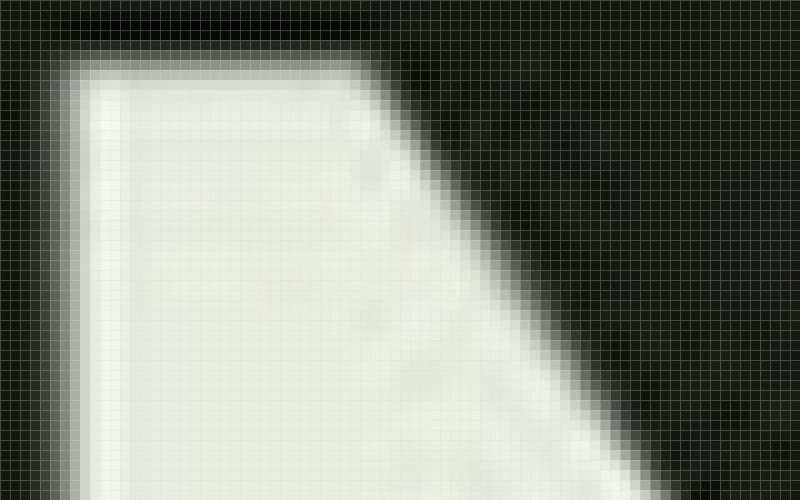
The close-up enlarges each comparison pixel into a 10 × 10 block without smoothing. Both sides come from a 2004-pixel-wide reconstruction. Grid lines are annotations; the measurements use the unmodified canvases. This magnification exposes the edge transition, rather than representing the normal viewing size.
Open full-size PNG (800 × 500; new tab)The loss of edge definition is visible in the delivered lettering. The dimensions also establish something less subjective: the browser cannot display one independent source sample per device pixel from this selected resource. Even at DPR 1, the 1002-CSS-pixel width exceeds 640.
That does not tell us why this rendition was generated or selected. We have requested that explanation in the existing Meta support case, including whether a sharper supported rendition is available for the public business profile.
LinkedIn: the newer result deserves to be shown
LinkedIn's Page image guidance lists 1512 × 256 for the Page cover, accepts PNG and JPEG below its 3 MB limit, and recommends high-resolution JPEG for best resolution. Our original PNG was exactly 1512 × 256 and 86,646 bytes. We also tested a sharp 3024 × 512 JPEG, 305,330 bytes.
On October 17, we replaced the PNG with that 3024 × 512 JPEG before recording the 1128 × 191 result. The JPEG remained the uploaded cover for the October 24 capture and is the control below. We made no further upload during the October 24 check.
On October 17, we recorded a selected 1128 × 191 JPEG for a cover about 792 CSS pixels wide. The markup's sizes hint described about 491 CSS pixels at that viewport, which gave us a concrete responsive-selection question to ask support. It did not establish causation.
On October 24, the member-view page selected a 1510 × 256 JPEG, 39,759 bytes. That is a substantial increase over the earlier file. The newer element had no srcset or sizes attribute.
LinkedIn: upload control, 3024 pixels resized directly to 1584.

LinkedIn: October 17 resource, 1128 pixels enlarged to 1584.

LinkedIn: October 24 resource, 1510 pixels enlarged to 1584.

Each panel is the same 540 × 90 region of a 1584-pixel-wide canvas, resized once with Lanczos. Panels are stacked so their labels and differences remain usable on phones.
Open full-size PNG (540 × 90; new tab)The newer rendition is closer to the direct-source control. Its 1510-pixel width nearly covers the 1584 device pixels in this view. The earlier 1128-pixel output and markup describe the October 17 capture; they do not establish the October 24 behavior.
We still want an explanation for the processing and selection behavior. The dates and page views differ, and support has not attributed the change to a fix. The existing case now explicitly requests review by the team responsible for Page image processing and delivery.
Spotify: the thumbnail and the enlarged view need different answers
Our show artwork is a 3000 × 3000 PNG. That falls within Spotify's published show-art recommendation of square artwork between 1400 and 3000 pixels. The same guide advises checking the design at large and small sizes.
The ordinary show thumbnail selected a 640 × 640 WebP. At about 217 CSS pixels square on a 2× display, it had enough encoded pixels for the observed box. Reducing a 3000-pixel original to 640 pixels is not, by itself, evidence of a bad rendition.
Clicking View show artwork changed the context. The enlarged view selected a different resource: a 640 × 640 JPEG, 38,837 bytes. The image itself occupied 640 CSS pixels square. Its width was half the 1280 device pixels needed to cover that box without enlargement.
The opening crops show the practical result. For a numerical check, we measured one straight edge of the capital N in the show title. We rendered both paths to 1280 × 1280 with Lanczos, then averaged the encoded green channel over rows 535–544. Each profile was normalized separately using its own background and foreground means. The transition from 10% to 90% extended across 1.35 pixels in the direct-source control and 2.35 pixels in the delivered-image reconstruction. This measures transition shape independently of absolute contrast loss.
Spotify pixel close-up: original control.

Spotify pixel close-up: delivered-image reconstruction.

Each square is one pixel of the 1280 × 1280 comparison canvas, enlarged 10× with nearest-neighbor. The chart below averages ten rows in this crop: vertical coordinates 535–544. These are reconstructed output pixels, including the stated Lanczos resampling, rather than native pixels taken directly from the 640-pixel JPEG.
Open full-size PNG (800 × 500; new tab)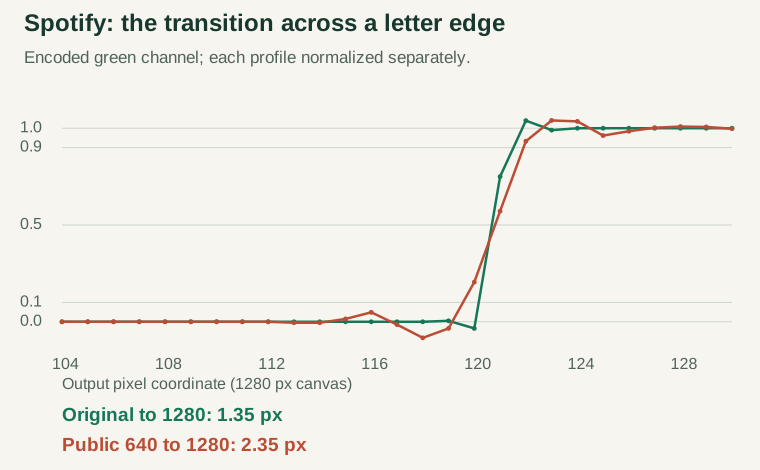
This is one edge in one image, with a stated resampler and coordinates. It supports the visible softness in this example. It does not measure every part of the image, separate resizing from compression, or reproduce the browser's exact filter. The raw profiles are included as CSV so the result can be challenged or repeated.
X provides a useful comparison
The signed-out X header selected a 1500 × 500 JPEG for a 600 × 200 CSS-pixel box. At DPR 2, its 1500-pixel width exceeded the 1200 device pixels of the display box. Its responsive image list included multiple widths, and the selected resource was the largest one listed.
We have not reconstructed the exact original upload for that header, so we make no source-fidelity claim for X. It is still useful evidence: the same general class of business banner can be delivered with enough pixels for the observed layout. The codec name alone is not a diagnosis; this adequately sized example is also a JPEG.
Keep the vector master; generate the pixels internally
Logos and lettering often start as vectors. Yet several major services document only raster formats for these profile and branding uploads:
| Upload | Documented formats |
|---|---|
| LinkedIn Page images | PNG, JPEG |
| X profile and header photos | JPG, GIF, PNG; no animated GIFs |
| YouTube profile pictures | JPG, GIF, BMP, PNG; no animated GIFs |
SVG is absent from these documented lists. Creators must export pixels before the platform decides which pixels it needs.
A platform could accept a static SVG master, retain it, and rasterize fresh renditions for each required size. If a layout later needs a 2560-pixel banner instead of 1280, it could regenerate the image internally. The owner would not need to find the design file and upload another export. Crop and focal-point settings could remain separate from the master.
Rasterizing vectors at a chosen resolution is routine graphics work. A public upload pipeline also needs sanitization, resource limits and predictable font handling. A restricted SVG subset, outlined lettering and self-contained assets would make that contract clearer. Browsers already restrict scripting and external resources when SVG is used as an image; a server-side renderer needs its own controls.
This proposal would preserve vector detail for future exports. It would not recover detail from a small photograph embedded inside an SVG. Retaining original PNGs and JPEGs would help too, within their source resolution. In every case, the page must still select a rendition large enough for its actual display box.
Publish one image contract and use it in the upload dialog
Creators need one authoritative, versioned specification covering accepted files, upload minimums, recommended dimensions, safe areas and delivered renditions. The upload hint, validation error and support article should all use that specification.
Even official guidance can require interpretation. YouTube's banner tips recommend at least 2560 × 1440. Its technical branding guide gives a 2048 × 1152 upload minimum and recommends 2560 × 1440, especially for TV. An acceptance minimum and a quality recommendation can coexist; they should be labeled consistently wherever the user encounters them.
We did not inspect YouTube's upload dialog. The design requirement is broader: when specifications change, the dialog and help page should update together. Stale hints should not send creators back to the graphics editor. A useful technical article should also explain what happens after acceptance: cropping, encoding, responsive selection, pixel density and enlarged views.
Crisp artwork benefits the platform too
A banner appears inside the platform's own product. Soft logos make that interface look worse as well as weakening the creator's presentation. Clear artwork helps people recognize the business or show they came to see.
Retaining masters and generating suitable cached renditions could also spare creators repeated exports and support conversations. Platforms can choose sensible bandwidth and decode budgets while supplying enough detail for the view they designed. The thumbnail and enlarged-artwork examples show why one size need not serve every context.
Compare the artwork
Start with the lettering at 2×. Switch between the original and Spotify’s image at the same zoom, or choose 4× for a closer look.
Image
Zoom

2× lettering detail · Original artwork.
Open this view as PNG (640 × 640; new tab)The 2× and 4× views are fixed crops of the same 1280 × 1280 comparison canvases, centered on the Namegarage lettering. They enlarge the pixels for inspection; they are not Spotify’s normal display size. Changing the image keeps your zoom.
How to inspect your own images
Keep the original file. Then inspect the actual image element, its selected currentSrc, its rendered rectangle, srcset, sizes, object-fit, and the device pixel ratio. In browser DevTools, selecting the image and evaluating this gives a small starting record:
const image = $0; // Select the actual <img> element first.
const box = image.getBoundingClientRect();
({
  currentSrc: image.currentSrc,
  cssWidth: box.width,
  cssHeight: box.height,
  dpr: window.devicePixelRatio,
  targetWidth: box.width * window.devicePixelRatio,
  srcset: image.srcset,
  sizes: image.sizes,
  objectFit: getComputedStyle(image).objectFit
});
Save the selected resource and decode its dimensions from the file. Do not infer them from a CDN path or rely on naturalWidth alone: that property reports a density-corrected intrinsic width in CSS pixels. In our Spotify thumbnail capture, naturalWidth was 231 while the downloaded file decoded to 640 pixels wide.
Our resource acquisition exported the observed currentSrc URLs through the browser's page-asset tool. This is a download of the selected resource, not a capture of the exact original HTTP response; content negotiation can affect the encoding returned. The saved bytes and hashes make clear which files this analysis actually uses.
Download the original resources, capture metadata and reproduction script. The archive includes the pinned dependencies and instructions needed to regenerate the measurements and figures locally.
For visual comparisons, use the same artwork, crop, output dimensions and resampler. Compare with an original resized directly to the target, rather than placing a large source beside a tiny thumbnail. Keep the comparison figures lossless, provide the unmodified resources, and include a page-context capture separately. A screenshot is useful context; it adds another rendering and encoding stage, so we did not use screenshot pixels for the edge measurement.
Run the same check on the article's own figures, including after publication. Crisp source files can be lost at that step too.
What a useful technical answer would explain
An image-specification article answers what can be uploaded. It leaves open what dimensions and encoding visitors receive, how a rendition is selected for each layout and pixel ratio, and whether an enlarged view can request more detail than a thumbnail.
We have asked Meta and LinkedIn to route the existing cases to their technical teams and answer those questions. As of October 24, 2026, neither has supplied a substantive technical finding or confirmed the receiving technical team. Spotify is an independently measured example here; we have not opened a Spotify cover-quality support case as part of this investigation.
Bandwidth, caching and decode costs are valid engineering constraints. The useful outcome is a documented tradeoff and a supported path to legible artwork at the size the product displays. Until then, measuring the delivered image is more informative than another round of larger exports.
This investigation came from building Namegarage. If you are naming a product or company, browse the domain catalog. The files, measurements and reproduction script accompany this article so readers can inspect the evidence themselves.
 Hacker News
 X
X
 LinkedIn
Comments
Comments are reviewed before publication. The Author badge marks replies from the author.
Your test session has expired. Stop testing to use comments and sign-in normally, or open a fresh test link to keep testing.
Stopping testing reloads this page in normal mode.
Read approved comments on the discussion page.
Open the discussion page